
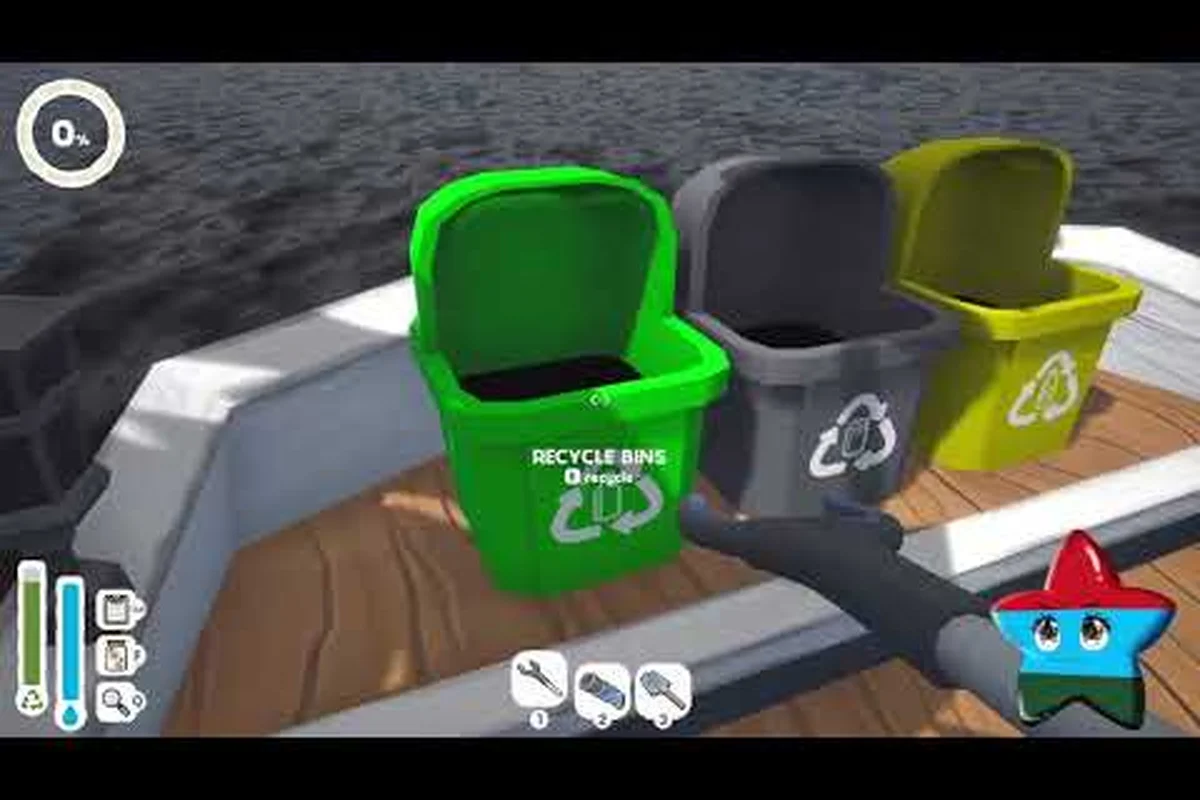
Choosing what carries over from the Island Restoration demo to the full game affects how you spend your first hour after launch, and the answer is more interesting than a simple "nothing transfers." Solo developer EliteTheDev has built a cozy cleaning simulation that grew from a single Tropical Isles region into a four-biome journey, and the demo has served as a live testing ground through several major overhauls. According to the official Steam page, full release lands September 23, 2026 at $9.99 with a 10% launch discount, so anyone still polishing the demo right now is essentially rehearsing the tutorial. This guide explains what stays, what gets replaced, and what you should test in the demo before launch day if you want a head start on the upgrade tree.
Demo vs Full Game: Scope, Biomes, and Content Size
The Island Restoration demo is not a small slice of the full game; it is roughly one quarter of the total content, restricted to the Tropical Isles region. The full game expands to four biomes across twelve distinct maps, layered with a built-in randomizer and infinite side contracts that the demo never touches. If you have spent twenty hours maxing out the demo, the launch build will still feel like a fresh chapter rather than a continuation.
| Feature | Demo (Tropical Isles) | Full Game (All Biomes) |
|---|---|---|
| Biomes available | 1 (Tropical Isles only) | 4 unique biomes |
| Total maps | ~3 redesigned islands | 12 distinct maps |
| Cleaning tools | 6 (all unlocked) | 6 unlockable tools |
| Side contracts | None | Infinite procedurally offered |
| Randomizer mode | Not available | Built-in randomizer |
| Boat cosmetics | Preview only | Full customization |
| Skill tree | Small preview branch | Complete skill tree |
| Animals to find | Limited set | More animals to pet and rescue |
| Save Anytime | Confirmed | Confirmed |
According to community testing, the demo starts you with a few upgrades already unlocked so you can enjoy the core loop without worrying about equipment progression, which means the Tropical Isles region plays more like a sandbox than a progression-locked tutorial. The full game closes that sandbox off and routes every player through a real upgrade ladder.
Players who want to preview the upgrade ladder before launch can already test a small branch of the skill tree in the current demo build, which is one of the few mechanics that actually carries over with identical behavior. If you are new to the core loop, the Island Restoration beginner guide covers the basic cleaning-tool rotation so your demo time translates cleanly into full-game muscle memory.
What the Demo Does Not Show You
Three mechanics are entirely absent from the current demo build and only appear once the full game ships. The built-in randomizer shuffles island layouts and pollution patterns for replayability, which the demo cannot preview because it has only three hand-crafted maps. Infinite side contracts are repeatable mini-jobs offered between main story islands, and they are how the full game stretches its twelve maps into dozens of hours of play. Finally, the full boat cosmetic customization system is gated to the full release, although the demo does include a small cosmetic preview so you can see the boat model and camera before launch.
What Carries Over From Demo to Full Game
The single most common question on Steam Discussions right now is what carries over from the Island Restoration demo to the full game on launch day, and the answer is short. Your save file does not transfer, your unlocked upgrades reset, and your discovered animals do not carry over. What does survive is mechanical familiarity: the cleaning tool controls, the pollution types, the basic island navigation, and the muscle memory you built up while clearing Tropical Isles.
| Carryover Type | Transfers? | Notes |
|---|---|---|
| Save file progress | No | Fresh save on launch |
| Unlocked cleaning tools | Partial | Demo grants all 6, full game unlocks them through progression |
| Skill tree unlocks | No | Resets; preview only in demo |
| Animal collection | No | Reset on launch |
| Achievements (if any) | No | Full-game achievement list is separate |
| Controller / Steam Deck settings | Yes | Controller bindings persist across the same Steam account |
| Keybindings (KB+M) | Yes | Rebinds are stored per-user in Steam |
| Cleaning tool muscle memory | Yes | The same 6 tools, same controls |
| Pollution type knowledge | Yes | Oil, garbage, vines, and mud behave identically |
According to EliteTheDev's own demo announcement post on Steam, the demo is positioned as a way to enjoy the core loop, not as a beta that pre-unlocks full-game progress, so any carryover expectations should be set accordingly. The Island Restoration demo vs full game comparison is really a comparison of the same six cleaning tools and the same four pollution types, wrapped in a much larger world.
One subtle piece of carryover that the community has flagged: because the demo overhaul added the skill-tree preview branch using the same node IDs the full game will use, players who tested the preview have already mapped out which upgrades feel essential. That knowledge, not the unlocks themselves, is what actually transfers.
Why Save Files Do Not Transfer
The developer confirmed through Steam Discussions that the demo's save format is intentionally lighter than the full-game build, because the full game tracks contract progress, biome unlocks, and animal collections that the demo never has to record. Reusing the demo save would force a conversion step on launch day, and the solo developer has prioritized a clean launch over a feature that only helps the small percentage of players who complete the demo before release. This is also why Steam Achievements earned in the demo do not roll into the full game's achievement list; the full game has its own list tied to the launch build.
System Requirements and Steam Deck Performance
The Island Restoration system requirements are unusually light because the game is a stylized cleaning simulation rather than a high-fidelity simulation, and that is exactly why the Steam Deck performs so well. The full release runs on hardware that is far below modern indie standards, which makes it an easy recommendation for laptop players and handheld owners who want a cozy low-spec title.
| Spec Tier | Minimum | Recommended | Steam Deck Target |
|---|---|---|---|
| OS | Windows 10 64-bit | Windows 10/11 64-bit | SteamOS 3.x |
| CPU | Intel i3-4130 / AMD FX-6300 | Intel i5-8400 / AMD Ryzen 5 2600 | Zen 2 APU (verified) |
| RAM | 4 GB | 8 GB | 16 GB shared |
| GPU | Intel HD 4400 / Radeon HD 7750 | GTX 1050 / RX 560 | Van Gogh APU (verified) |
| Storage | 2 GB | 2 GB (SSD optional) | 2 GB |
| Resolution | 720p @ 30 FPS | 1080p @ 60 FPS | 1280x800 @ 60 FPS (target) |
According to the Island Restoration Steam page, the developer added full controller support and Steam Deck support during the demo phase, and that patch was one of the largest demo updates to date. The Steam Deck version targets 60 FPS at native 1280x800 resolution, which is a comfortable frame rate for a cleaning simulation that does not have fast camera pans or heavy particle effects. The full system requirements have not been published as a separate spec sheet, but the verified Steam Deck status implies the same ceiling applies to PC builds at low-to-medium settings.
Steam Deck-Specific Settings
Two Steam Deck-specific settings shipped with the Island Restoration major demo update: controller input icons that swap automatically when the handheld is detected, and an ESC keybind to exit the nozzle-selection wheel without using a mouse. Both settings are stored per-user in Steam, which is why they are the one piece of demo data that genuinely carries over to the full game. If you remapped your cleaning-tool hotkeys on the demo, those rebinds will be active the moment the full game boots on the same account.
Players testing the demo on a lower-spec laptop should expect the same low-impact behavior the Steam Deck shows, because the rendering pipeline is built around a small number of paintable pollution decals rather than a large environmental mesh. If you have any doubt about whether your hardware will run the launch build, the demo is a free and accurate performance proxy.
What Actually Changes at Launch
Beyond raw scope, the launch build introduces three meaningful changes that anyone replaying the demo on day one should be aware of. First, the six cleaning tools you used freely in the demo are now gated behind the full skill tree, so the first hour of the full game feels slower and more deliberate. Second, the upgrades you unlocked for free in the demo now cost in-game resources, which is how the developer gates the harder pollution types like oil spills and thick mud. Third, the procedural randomizer and infinite side contracts are the new long-term progression hooks that the demo never had.
| Change | Demo Behavior | Full Game Behavior |
|---|---|---|
| Tool unlocking | All 6 available | Unlock through skill tree |
| Upgrade cost | Free (already applied) | Costs in-game currency + materials |
| Pollution difficulty | Static per island | Scales with biome + randomizer |
| Side contracts | None | Infinite, procedurally offered |
| Randomizer | Off | Built-in toggle on the world map |
| Boat cosmetics | Preview only | Full unlock + customization |
| Tutorial flow | Skippable | Mandatory first-island onboarding |
| Save Anytime | Confirmed | Confirmed |
The Island Restoration demo vs full game distinction, in practice, is a distinction between a sandboxed Tropical Isles and a structured four-biome campaign. Both versions share the same six cleaning tools, the same four pollution types (oil spills, garbage, vines, and mud), and the same boat controls, so the muscle memory you built in the demo is genuinely useful, even if the unlocks do not transfer. For a deeper look at the launch trailer and the new biome reveals, the full game vs demo update notes cover what was shown in the official gameplay trailer.
The Skill Tree Reset Is Intentional
The skill tree preview branch in the demo was added specifically so players could stress-test the upgrade nodes before the developer locked the final values, and according to the official news post, the preview will not roll into the full game's progression. That is not a bug; it is how the developer validated the upgrade pacing. The launch build uses a different node order and tighter cost scaling so that the first biome feels like a real first chapter, not a sandbox that you already maxed out in the demo.
Should You Play the Demo Before Launch?
If you are on the fence about whether the $9.99 price tag is worth it on September 23, the demo is genuinely the best preview you can get, because it lets you test the six cleaning tools, the Steam Deck build, the controller remapping, and the skill-tree pacing all in one sitting. Players who finished the demo and want a structured walkthrough of every Tropical Isles cleanup can use the Island Restoration 100% guide to squeeze the last few animals and cosmetics out of the demo before launch.
| Player Type | Demo Recommendation |
|---|---|
| Unsure about buying | Play 1–2 hours of the demo first |
| Steam Deck owner | Demo verifies your settings before launch |
| Achievements hunter | Skip demo, start fresh on launch |
| Animal collector | Play demo, but reset expectations on launch day |
| Speedrunner | Skip demo, full game's randomizer is the real meta |
| Cozy-sim fan | Demo is highly recommended; the core loop is the same |
According to community data, players who completed the demo and immediately bought the full game reported a smoother first hour because they already knew which cleaning tool to switch to for each pollution type. That is the kind of carryover the developer designed the demo to deliver, and it is also why the demo's Tropical Isles overhaul focused so heavily on visual clarity and flow rather than on new mechanics.
What to Test in the Demo Before Launch
Four things are worth verifying in your final demo session. First, confirm that your controller remaps survive a relaunch, because that is the one setting that genuinely carries into the full game. Second, test the skill-tree preview branch and note which upgrade nodes feel essential, because the full game's tree will be larger but share the same stat logic. Third, clear every animal in the demo so you have a personal checklist for the launch build's expanded animal roster, and the animals in the demo guide can help with that. Fourth, run the demo on your target hardware at the resolution you plan to use on launch day, so you have a verified performance baseline.
Launch Day Checklist and Final Recommendations
The Island Restoration demo to full game transition is a fresh start wrapped around a familiar core, and the smartest way to approach September 23 is to treat the demo as a settings and pacing test rather than as a head start. Your save resets, your upgrades reset, and your animal collection resets, but the six cleaning tools, the four pollution types, the boat controls, and your controller rebinds all carry over in the form of muscle memory and per-user Steam settings.
| Checklist Item | Action |
|---|---|
| Controller rebinds | Test in demo, confirm they persist |
| Skill tree nodes | Map out the upgrades you liked in the preview branch |
| Animal roster | Clear the demo, then reset expectations for the full game |
| Hardware verification | Run the demo at your target resolution |
| Wishlist | Already done; check your notifications on launch day |
| Launch discount | 10% off for the first two weeks; do not wait past October 7 |
| Save Anytime | Confirmed for both demo and full game |
| Price | $9.99 USD with regional adjustments |
According to the official release date announcement, the launch discount runs for the first two weeks, so the practical decision window is between September 23 and October 7, 2026. There is no early-access tier and no demo-save bonus, so the only reason to wait past the launch window is if you want a deeper discount during a future sale, which is a reasonable trade-off if you are not in a hurry.
The Island Restoration demo to full game experience is built around a simple promise: the same cozy cleaning loop you tested in Tropical Isles, scaled up to four biomes with a real upgrade ladder, infinite side contracts, and a built-in randomizer. Demo saves do not carry over, but the knowledge you built up while playing absolutely does, and that is the part of the carryover conversation that actually matters on launch day.
Frequently Asked Questions
Does my Island Restoration demo save carry over to the full game?
No, the developer's official demo announcement confirms that demo save files do not transfer to the full game because the full build tracks more data, including biome unlocks, contract progress, and the expanded animal roster. The only things that persist are per-user Steam settings like controller rebinds and keybindings, which live in your Steam profile rather than in the game save.
What changes between the Island Restoration demo and the full game?
The demo ships with all six cleaning tools unlocked and one biome available, while the full game adds three more biomes for a total of four, gates the tools behind a complete skill tree, and adds infinite side contracts plus a built-in randomizer. Boat cosmetic customization is also expanded in the launch build, although the demo already includes a small preview of the boat model.
What are the Island Restoration system requirements for PC?
The full game has not yet published a separate spec sheet, but the verified Steam Deck status and the controller-support patch confirm that the engine targets low-spec hardware, and the demo runs comfortably on integrated graphics at 720p. The Steam Deck target is 60 FPS at 1280x800, which sets a realistic performance ceiling for budget laptops.
Does Island Restoration work well on Steam Deck?
Yes, the developer added Steam Deck support in one of the largest demo updates, including controller-specific settings, automatic input icon swapping, and an ESC keybind to exit the nozzle-selection wheel. The handheld is listed as a verified target for the full game at 60 FPS in 1280x800, which is ideal for the cozy pacing of a cleaning simulation.
Should I play the demo before the full game launches?
Playing the demo is highly recommended if you are unsure about the $9.99 price tag, because the core cleaning loop is identical to the launch build and the demo lets you verify your controller rebinds and hardware performance for free. Players who want a clean launch experience can skip the demo entirely, since saves do not transfer and Steam Achievements earned in the demo do not roll over.